Process
When I look back at the assignments I already did for this course, I notice that I have been moving towards this question for a while. In Session 1, I already mentioned making an accessible Xbox controller as one of my own examples of tinkering. In Assignments 1.1 and 1.2, I described how my process moves between ideation and physically trying out. In Assignments 2.1, 2.2, 2.3, and 2.4, I worked on a modular dock system and slowly realised that something can be modular without automatically being very tinkerable. And in the group assignment, I also noticed how much difference it makes when a design problem becomes physical and hands-on instead of staying only on a screen. That made this assignment feel less like starting from zero and more like connecting the dots.
My field, Interaction Technology, is about studying and shaping the interaction between people and IT-based technologies. The University of Twente describes the programme as moving from ideation to prototyping to evaluation, with a focus on designing intelligent, interactive, and socially aware systems that fit end-user needs. The page also explicitly gives examples, such as robots that respond to human emotions and technologies for mediated social touch. That fits very well with tinkering, as it was presented in the course. In the slides, tinkering is treated as a tool, not a truth, and is linked to hands-on exploration, trial and error, iteration, material dialogue, and making do. The slides also frame tinkering as a playground built around a goal, seed, toolbox, facilitator, and space. In Invent to Learn, tinkering is described as a powerful form of learning by doing and as an iterative way of approaching problems through experimentation and discovery.
These ideas also help explain why the three problems I selected fit tinkering at a course level. All three involve technical hurdles that are difficult to understand fully in the abstract, but become clearer when they are translated into a seed, a toolbox, and a sequence of iterations. They can each start from a small working core, invite physical experimentation, and grow into multiple different outcomes instead of leading to one fixed solution. That is also why they feel more suitable for tinkering than for a purely linear design approach.
For this assignment, I chose three problems from my field that are strongly physical and that, in my opinion, become better when they are approached through tinkering rather than only through planning or abstract design.
1. Adaptive game controller design
This is probably the clearest example for me, because it already connects back to my Session 1 assignment. There, I used "making an Xbox controller" as one of my real tinkering examples, and I framed the design goal as creating an accessible controller for people with disabilities.
Problem
A standard controller assumes one "normal" body, grip, reach, and amount of strength. In reality, that is not true. Some users cannot comfortably use two thumbs at once, some cannot press small buttons repeatedly, and others need support for only one hand, foot input, larger surfaces, or alternative placements. The challenge is therefore not only to make a controller that technically works, but to design one that can be adapted to different physical abilities and preferences.
Why is this suitable for tinkering
I think this is a very suitable problem for tinkering because you cannot really solve it well from sketches alone. You only start to understand the problem once you physically try different positions, sizes, forces, angles, resistances, and mounting methods. This makes it very hands-on and iterative. It also fits well with the course idea that tinkering is useful for problem framing, material knowledge, and design space exploration, especially when there is no single correct answer.
This also connects to something I noticed in my own building block assignments. My modular dock system was structurally clear, but I often got feedback that it was not yet very tinkerable. That distinction matters here as well. An adaptive controller should not only be configurable, but should also invite trying, changing, testing, and discovering.
Type of playground
I would probably make this a blocked complexity playground. In the Session 6 slides, this type of playground is described as one where the seed acts as an enabler that removes technical hurdles and opens up new application areas to explore. That fits this case well.
Sketch and suggestions for tinkering material
For this problem, I would design a playground with a working seed and a flexible toolbox. The seed could be a simple controller core that already connects to a PC or a test game. That would remove the biggest technical hurdle, namely getting input to actually register somewhere. Around that seed, the toolbox could include large push buttons, sliders, joysticks, pedals, soft switches, touch pads, foam grips, velcro straps, clamps, desk mounts, and blank modules that users can adapt to themselves. See Figure 1 for the sketch.
Target group
The target group could be Interaction Technology students, assistive technology designers, occupational therapists, gamers with motor impairments, or mixed co-design groups where users and designers work together.
Onboarding and scaffolding
I think onboarding would matter a lot here. If users are confronted with too many parts immediately, the threshold becomes too high. So I would start with one clear base setup that already works and only a few basic modules at first. From there, participants can expand. Scaffolding could consist of short visual setup cards, persona cards, challenge cards, and observation sheets. A facilitator would also be important to help people get unstuck without taking over the process.
This fits the slides on scaffolding and facilitation quite well. There, scaffolding is connected to building skills, increasing complexity step by step, and helping participants stay in flow, while the facilitator helps create a safe space, maintain time, and support reflection.
Suitable goal
A suitable goal would be: explore how a game control can be adapted to different bodies and abilities while keeping the interaction understandable, comfortable, and enjoyable.
Suitable assignments
Suitable assignments could be: build a controller for someone who can only use one hand; redesign the same controller for foot input; make a version for someone with limited finger strength; or let another participant test the controller and observe where they get stuck.
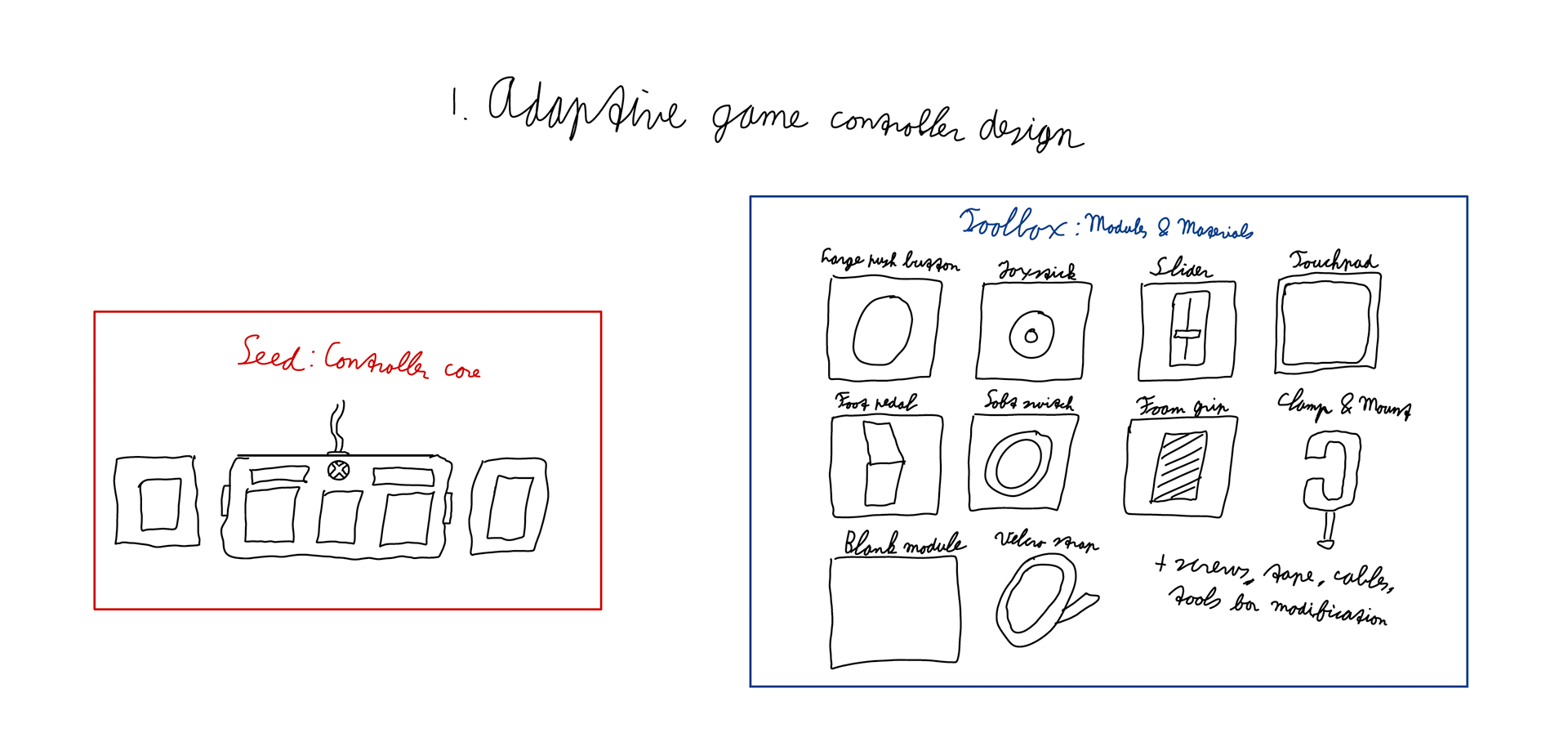
Figure 1. The sketch of the Seed and Toolbox for the first idea.
2. Biosensing / haptic wearable design
The second problem area I chose is biosensing wearables or haptic wearables. This also feels like a strong fit, because the Session 5 slides explicitly mention toolkits for biosensing wearables as an interesting problem domain.
Problem
A lot of wearable technology can measure something, such as movement, stress, pulse, or posture. But the real challenge is not only the sensing itself. The difficult design question is how that information should be translated into feedback that is meaningful, comfortable, and usable. Where on the body should feedback be placed? How strong should it be? What kind of vibration, pressure, or rhythm feels supportive instead of annoying?
Why is this suitable for tinkering
This is a good tinkering problem because the important qualities are embodied and material. You cannot fully understand them through diagrams alone. You need to wear something, move with it, test it, compare it, and change it. That makes it a very physical design problem. It also fits the course idea that tinkering supports learning through direct experience and through dialogue with materials.
I also think it fits very well with the way I described tinkering spaces in my earlier assignments. My strongest tinkering moments often happened when it was easy to begin, easy to iterate, and easy to notice what changed. Wearables have that same logic when designed well: try something small, feel it immediately, then adjust.
Type of playground
This could work as either a blocked complexity playground or as a kit-based playground, depending on how open the toolbox becomes. The slides describe kit-based learning as more focused on learning the toolkit itself, while blocked complexity is more focused on exploration and innovation. In this case, I think the blocked complexity version is more interesting.
Sketch and suggestions for tinkering material
Here, the seed could be one simple sensing-feedback module that already works. For example, one sensor plus one vibration output, or one pressure input plus one LED/haptic output. The toolbox could then include straps, elastic bands, clips, foam, fabric sleeves, body maps, small vibration motors, LEDs, texture samples, and scenario cards for different contexts such as navigation, stress regulation, posture awareness, or breathing support. See Figure 2 for the sketch.
Target group
The target group could be Interaction Technology students, wearable designers, health-tech designers, cyclists, athletes, or people who need bodily feedback instead of screen-based feedback.
Onboarding and scaffolding
The onboarding should be very simple. I would begin with one challenge, like: make a "turn left / turn right" navigation signal, or make feedback for breathing rhythm. After that, participants can compare placements on the wrist, upper arm, shoulder, chest, or waist. Scaffolding could include placement templates, reflection prompts, body maps, and example mappings between signal and feedback.
This would also fit the slides on low threshold, high ceiling, and wide walls. The entry should be small and approachable, but the system should still allow many different outcomes and applications.
Suitable goal
A suitable goal would be: explore how bodily feedback can become interpretable, comfortable, and context-appropriate.
Suitable assignments
Examples of assignments could be: design a wearable for walking navigation; redesign it for cycling; compare three different placements on the body; make one very subtle version and one very noticeable version; or design a wearable that helps someone notice stress before it becomes overwhelming.
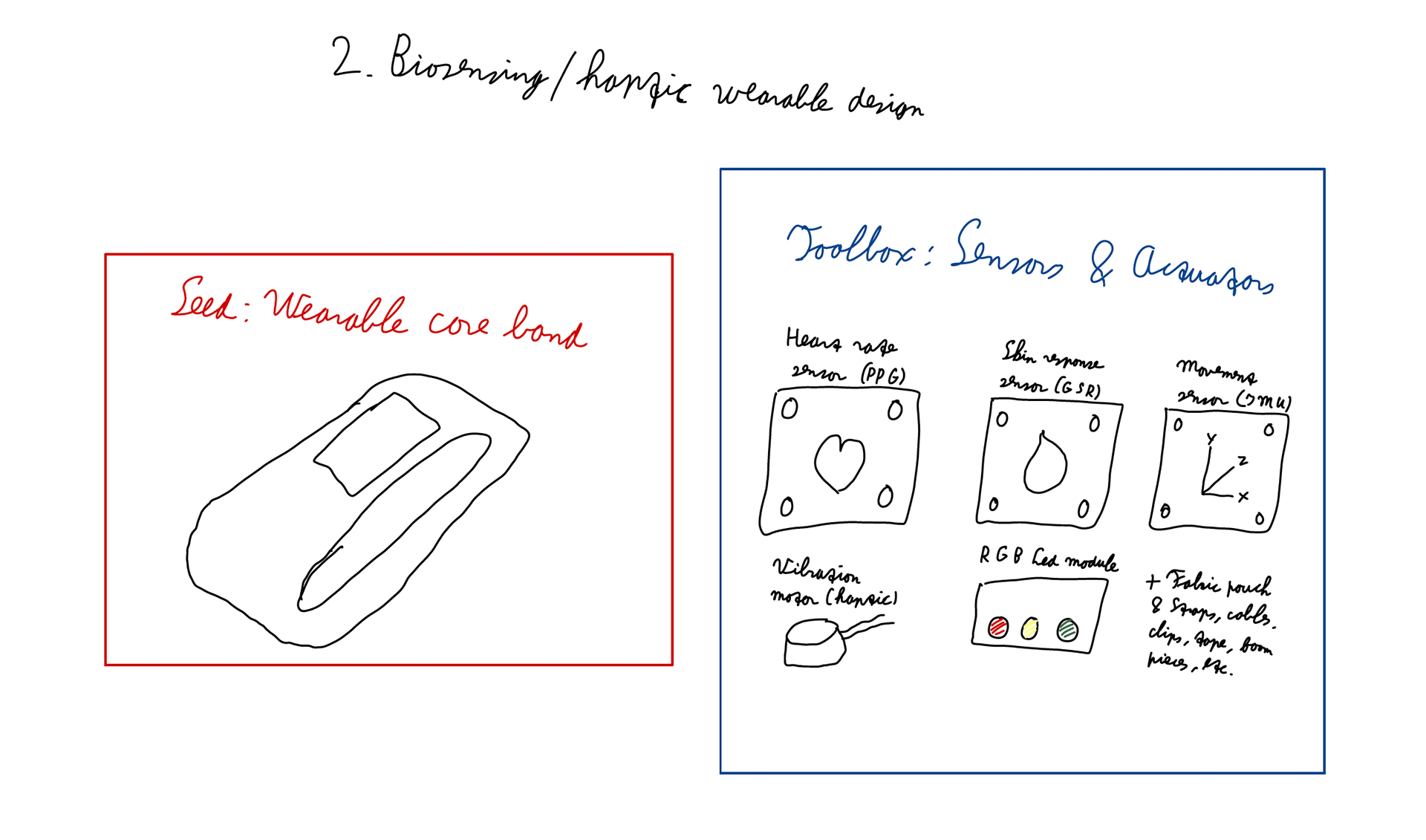
Figure 2. The sketch of the Seed and Toolbox for the second idea.
3. Social robot body language / robot handover design
The third problem area I chose is social robot body language or robot handover interaction. This one fits Interaction Technology strongly, because the UT programme explicitly mentions robots that recognise and respond to emotions, and the Human Media Interaction group works on multimodal interaction ranging from brain-computer interfaces to social robots. There is also a concrete HMI student assignment on improving object handover for visually impaired people through multisensory feedback and intuitive interaction design.
Problem
A robot can be technically functional but still communicate badly. The difficulty is often not only the mechanics, but also how movement, posture, timing, sound, and form are interpreted by people. This becomes even more important in handover situations. If a robot gives someone an object, the interaction should feel clear, safe, and intuitive.
Why is this suitable for tinkering
This is a very suitable problem for tinkering because small physical changes can completely change how the interaction is interpreted. A different pause, arm angle, motion speed, sound cue, or object grip can make a robot feel careful, awkward, pushy, helpful, or trustworthy. That is exactly the kind of problem where building and trying different variants teaches more than reasoning in the abstract.
It also matches the course examples given to us quite well. The slides explicitly mention robotics domains and also refer to the animatronics workshop as a blocked complexity example where the seed removes technical hurdles and lets participants explore a wider problem space.
Type of playground
This would again be a blocked complexity playground, because the technical hurdle of movement is already partly solved, allowing participants to focus more on interaction quality and interpretation.
Sketch and suggestions for tinkering material
For this problem, the seed could be one simple robot expression module that already moves, such as a servo arm, a gripper, or a body block with one moving part. The toolbox could then include cardboard shells, different arm attachments, soft and hard handover objects, LED modules, sound modules, eye/facial elements, and scenario cards such as "handover medicine," "ask for help," "comfort," or "warn." See Figure 3 for the sketch.
Target group
The target group could be Interaction Technology students, HRI designers, healthcare technology designers, and test users.
Onboarding and scaffolding
I would start with one very small challenge, such as: make the robot greet someone, or make the robot hand over an object clearly. After that, the same setup could be redesigned to feel more careful, more urgent, or more reassuring. Scaffolding could include role cards, observation sheets, scenario cards, and maybe a recorder sheet to document the iterations.
Suitable goal
A suitable goal would be: explore how robot movement and physical expression shape usability, trust, and interpretation in human-robot interaction.
Suitable assignments
Suitable assignments could be: build a handover behaviour for a visually impaired user; redesign it for a hospital context; compare two motion styles; or let other participants guess the robot’s intention and reflect on where interpretations differ.
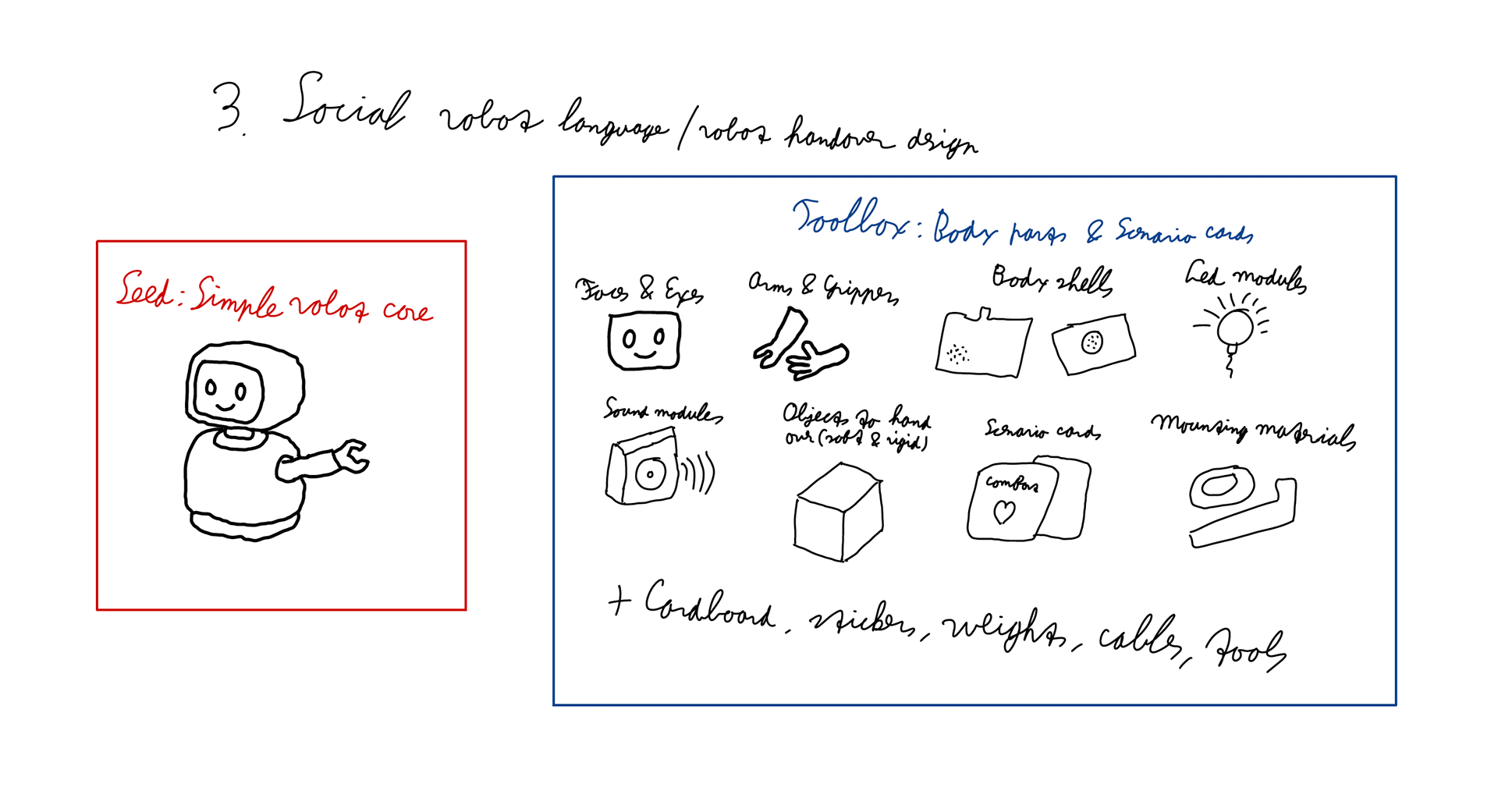
Figure 3. The sketch of the Seed and Toolbox for the third idea.
Reflection
Looking across these three examples, I notice that they all fit the assignment better than more screen-based ideas would. They are all clearly physical; they all involve real technical hurdles, and they all only become understandable through iteration, testing, and material exploration. That makes them feel much closer to the book and slides than, for example, a mostly digital workflow would.
I also notice that these three directions fit my field and my own interests quite naturally. The adaptive controller connects back to Session 1. The wearable idea fits well with the embodied and hands-on side of Interaction Technology. And the robot behaviour/handover idea connects strongly to the social and interactive side of the field.
What they also share is that they are not "one-trick pony" problems. They have room for variation and surprising outcomes, which is important because the slides repeatedly emphasise wide walls, high ceilings, and room for discovery.
Seen that way, tinkering in my field is not just a playful extra, but a serious design method for problems where materials, embodiment, interaction quality, and iteration are central to understanding the problem itself.