Group work and Collaborators
This concept was developed during the sixth Social Robot Design session as part of Group 1. The aim of the session was to explore how high-level robot behaviour can be designed, structured, and tested before full implementation. The session focused on autonomy, dialogue, vision, behaviour design tools, flowcharts, cards, and the challenge of moving from a puppet-like robot towards a more autonomous actor. The lecture framed robot behaviour through the Sense-Think-Act structure and discussed how designers can use tools such as flowcharts, cognitive walkthroughs, cards, boards, and software recipes to prototype behaviour.
Collaborators:
Maurits Dijkman, Bianca Filip, Ewoud Janus, Emilia Pavel, and Gijs Vis.
My contribution:
My contribution was to connect the behaviour design tool to our pet companion case and to Alan as our selected robot base. I helped translate the scenario into behaviour cards using the structure Step - Sense - Think - Act - Issue. I also contributed to the feature list by mapping what Alan already has, such as lights, joystick navigation, and sound output, and what Alan would still need, such as a camera, a microphone, proximity sensors, object recognition, speech recognition, an LLM, a mobile app, and a treat dispenser.
1. Session context
Session 6 focused on robot behaviour and autonomy. In previous sessions, we explored scenario, expression, embodiment, and ethics. This session added the question of how the robot actually decides what to do.
For our case, this is important because Alan should not only look suitable or move expressively. Alan must behave appropriately around an anxious dog. This means the robot needs to sense what is happening, interpret the situation carefully, act in a restrained way, and stop or retreat when needed.
The course slides showed that behaviour design involves more than writing a simple story, such as "the robot sees the dog and gives a treat." That behaviour actually depends on sensing, interpretation, decision-making, timing, movement, audio, and safety conditions. The slides also emphasised that computer vision can observe many things, such as navigation, object detection, person detection, and face analysis, but interpretation remains challenging.
2. Design tool: Behaviour Design Tool
The design tool developed in this session is called the Behaviour Design Tool. It is a low-fi, card-based tool for designing high-level robot behaviour before building the final system.
The tool helps designers break a scenario into small interaction moments. Each moment is written on a card using five categories:
1. Step: What moment in the scenario is happening?
2. Sense: What does the robot need to detect?
3. Think: What interpretation or decision does the robot make?
4. Act: What does the robot do?
5. Issue: What can go wrong, or what ethical/social risk appears?
This structure makes the behaviour easier to discuss because it separates observation from interpretation. For our pet companion robot, this distinction is important. For example, Alan may sense that the dog is near the door, but it should not automatically think "the dog wants to play." It may instead need to consider separation anxiety, freezing, avoidance, or stress.
Figure 1 shows the conceptual structure of the Behaviour Design Tool. The poster explains the workflow: first, map Alan's current and needed features, then create cards for each scenario moment, fill in the Step-Sense-Think-Act-Issue structure, discuss what technology is needed, update the feature list, and finally make a low-fi paper prototype. This figure shows the tool’s structure before and during application.
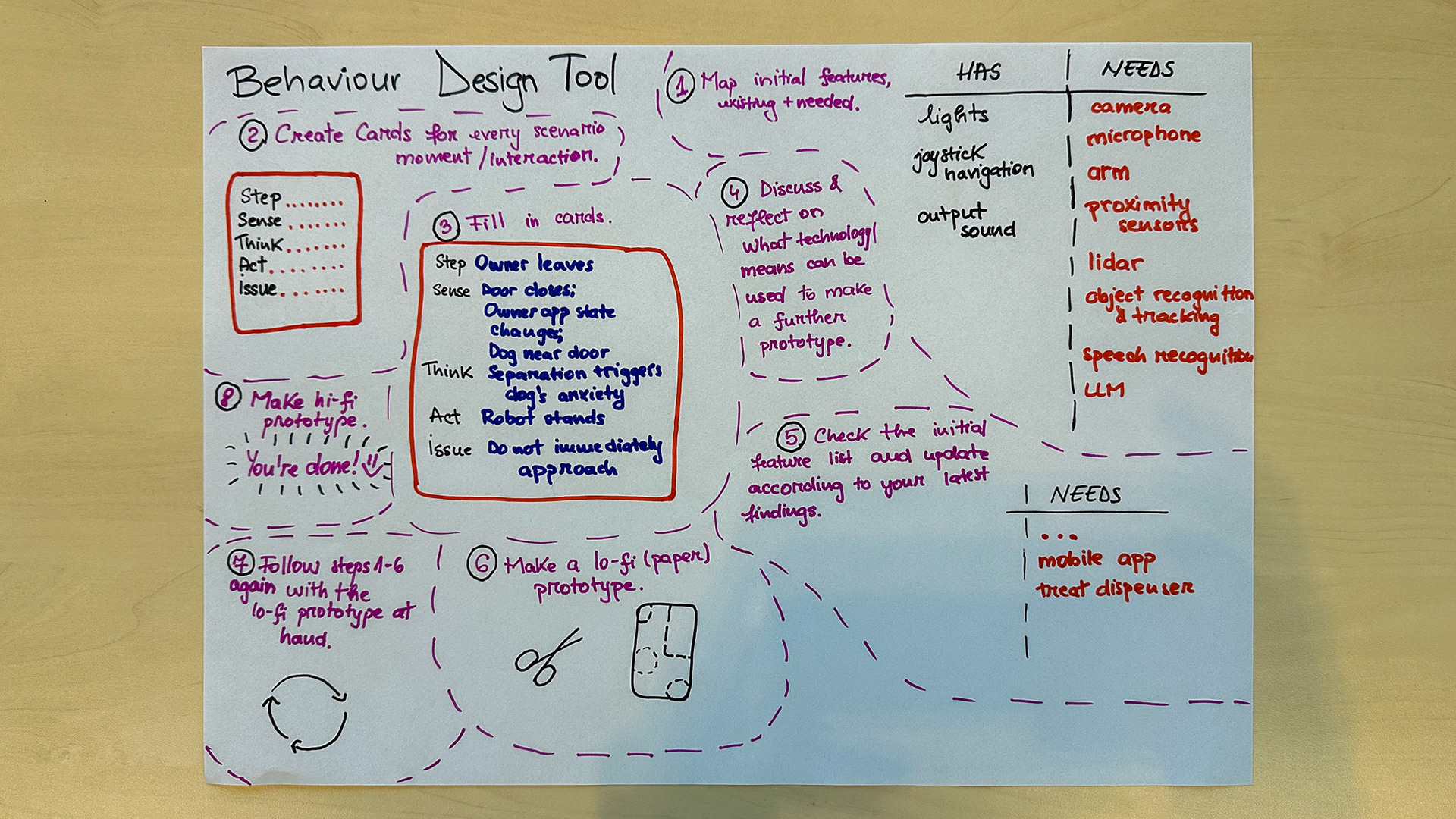
Figure 1. Conceptualisation - Behaviour Design Tool structure.
3. Tool materials
The tool consists of four main materials.
The first material is the feature map, where we listed what Alan already has and what Alan still needs. Alan currently has lights, joystick navigation, and sound output. The needed features include a camera, a microphone, an arm, proximity sensors, lidar, object recognition and tracking, speech recognition, an LLM, a mobile app, and a treat dispenser.
The second material is a set of behaviour cards. Each card represents one moment in the interaction scenario and uses the same categories: Step, Sense, Think, Act, and Issue.
The third material is the discussion loop. After filling in the cards, the group discusses whether the proposed sensing and behaviour are realistic, safe, and useful. This step is important because the tool should reveal complexity rather than hide it.
The fourth material is the low-fi prototype sketch, which translates the behaviour requirements into a possible physical and technical direction for Alan.
4. HRI knowledge embedded in the tool
The Behaviour Design Tool embeds HRI knowledge by forcing designers to separate sensing, interpretation, action, and risk. This makes it more specific than a generic software flowchart. A normal flowchart might say: "dog detected --> robot approaches." Our tool instead asks: What exactly was sensed? What interpretation is being made? What should the robot do? What could go wrong if that interpretation is wrong?
The first HRI concept embedded in the tool is the separation between perception, decision-making, and action. In robotics, control architectures often separate low-level sensing and actuation from higher-level execution and decision-making. For example, Alami et al. (1998) describe an autonomous robot architecture with functional, execution, and decision levels. In our tool, this idea is operationalised through the Sense-Think-Act structure: every behaviour card must state what Alan senses, what Alan interprets, and what Alan does. This prevents us from hiding uncertainty inside vague words such as "understands" or "knows."
The second concept is reactive versus deliberative behaviour. Brooks' subsumption architecture shows how robot behaviour can be built from layered reactive behaviours, where lower-level behaviours respond directly to the environment and higher layers can influence or suppress them (Brooks, 1986). Alami et al. (1998) also show the value of combining planned decision-making with real-time execution and reaction. In our tool, this is operationalised by separating Alan's fast safety behaviours from slower support behaviours. Stopping, pausing, and retreating should be reactive behaviours that can override slower decisions, such as activating a toy or sending an owner update.
The third concept is graceful degradation and failure recovery. Honig and Oron-Gilad (2018) show that robot failures in HRI can come from sensing, interpretation, action, or interaction breakdowns, and that recovery needs to be considered as part of the interaction. In our tool, this is operationalised through the Issue field on every card. This field forces the group to ask what Alan should do when sensing or interpretation fails. For example, if Alan detects movement but cannot tell whether the dog is curious, anxious, or avoiding, the safe behaviour should be to pause, reduce stimulation, or retreat rather than approach.
The fourth concept is social signal interpretation. Social signal processing research shows that social behaviour can be detected from cues such as movement, gaze, posture, and interaction patterns, but interpretation remains context-dependent. Vinciarelli, Pantic, and Bourlard (2009) describe social signal processing as the computational analysis of social signals and behaviours, while Fiore et al. (2013) show that interpreting social cues in HRI depends on how humans understand the robot's behaviour. In our tool, this is operationalised by making the Think step explicit and cautious. Alan is allowed to record observable signals, such as "dog near door," "dog moves away," or "dog stops moving," but it should not overclaim emotional states such as "happy," "calm," or "anxious."
Together, these concepts make the tool HRI-specific. It not only models software logic; it models the uncertainty of social interpretation, the difference between fast safety reactions and slower decisions, and the need for fallback behaviour when the robot does not know enough. This is important for our pet companion case because Alan should behave as if it is uncertain, not as if it fully understands the dog.
5. Application of the tool to our case
We applied the Behaviour Design Tool to the scenario of Alan supporting an anxious dog when the owner leaves the apartment. The goal was to design a behaviour sequence that avoids immediately approaching or overstimulating the dog.
The main scenario was:
The owner leaves the home. The dog moves near the door. Alan detects the dog's position and movement. Alan decides whether to stay still, use a light or sound cue, invite interaction, retreat, or send an observation to the owner.
Figure 2 shows the realised behaviour cards created during the session. Each card describes one scenario moment using the Step-Sense-Think-Act-Issue structure. The cards were used as a low-fi walkthrough of Alan's behaviour. They show how the tool moved from an abstract structure into concrete design decisions for our pet companion case.
The cards produced six main behaviour moments.
The first card describes the moment when the owner leaves. Alan senses that the door is closing, the owner's app state changes, and the dog is near the door. The interpretation is that separation from the owner may trigger anxiety. The chosen action is that Alan stays at the charging station. The issue is that Alan should not immediately approach the dog.
The second card describes the moment when the dog paces near the door. Alan senses movement through a camera or a proximity sensor. The interpretation is that movement might indicate anxiety, not play. The chosen action is a soft light signal with no movement. The issue is that Alan should not interpret pacing as engagement.
The third card describes the moment when the dog looks at Alan. Alan senses orientation or approach. The interpretation is possible curiosity, but still uncertain. The chosen action is to move very slightly or give a soft signal. The issue is to keep enough distance.
The fourth card describes the moment when the dog approaches Alan. Alan senses proximity or contact. The interpretation is voluntary interaction. The chosen action is to move the toy slightly towards the dog. The issue is that if the dog retreats, Alan must stop the interaction.
The fifth card describes the moment when the dog freezes or backs away. Alan senses no movement, increased distance, or hiding. The interpretation is possible fear or shutdown. The chosen action is that Alan retreats or powers down the interaction. The issue is that freezing should not be interpreted as calmness.
The sixth card describes the moment when the owner checks the app. Alan sends logged observations. The interpretation is that Alan should not claim emotional certainty. The action is to report observable behaviour, for example: "Alan approached the toy for two minutes. The dog's moving avoidance decreased." The issue is that Alan may not say "the dog is happy" or "the dog is calm."
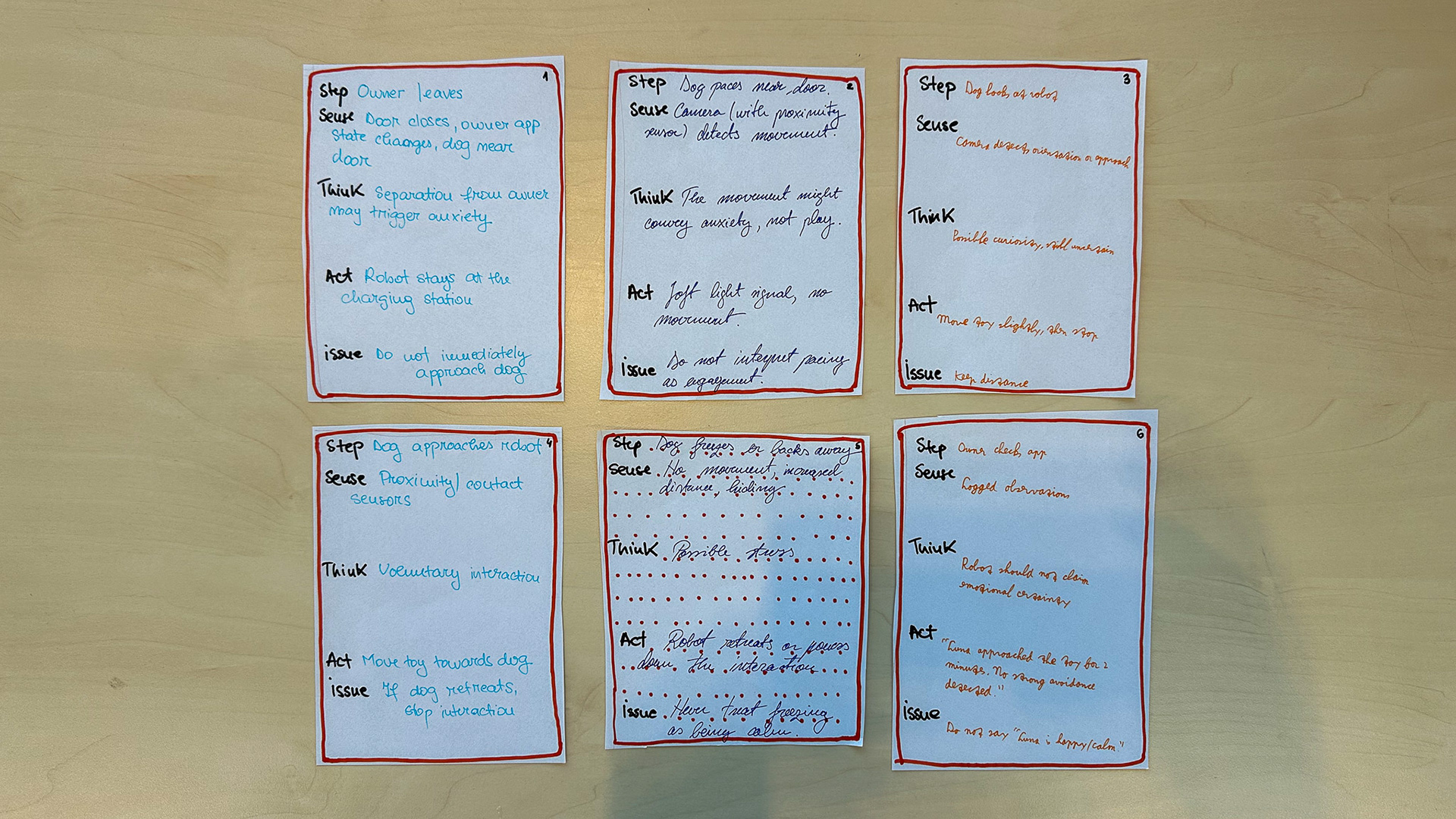
Figure 2. Realisation and in-action - Behaviour cards for the pet companion scenario.
6. Testing: Low-Fi walkthrough and paper prototype
The tool was tested through a brief low-fi walkthrough. We used the cards in Figure 2 to step through the interaction as if Alan, the dog, and the owner were present. This was not a full functional implementation, but it functioned as a paper-based Wizzard of Oz-style test: the group simulated what Alan would sense, think, and do at each moment.
The walkthrough revealed that our first behaviour idea was still too optimistic. At first, it was tempting to design Alan as an active companion that detects the dog and quickly starts interaction. However, the cards showed that this could be unsafe for an anxious dog. The robot should often begin by doing less: staying still, using subtle light or sound, or waiting.
Testing also showed that the most important behaviour is not "play with the dog," but stopping at the right time. When the dog retreats, freezes, or avoids interaction, Alan should not treat this as a failed interaction that needs another prompt. It should treat it as meaningful feedback and reduce stimulation.
Figure 3 shows the resulting low-fi paper prototype direction for Alan. The sketch connects behaviour requirements to possible hardware and interaction features, such as lights, sound, movement, and a possible arm or interaction module. This result translates the card-based behaviour model into a first physical and technical direction for the robot.
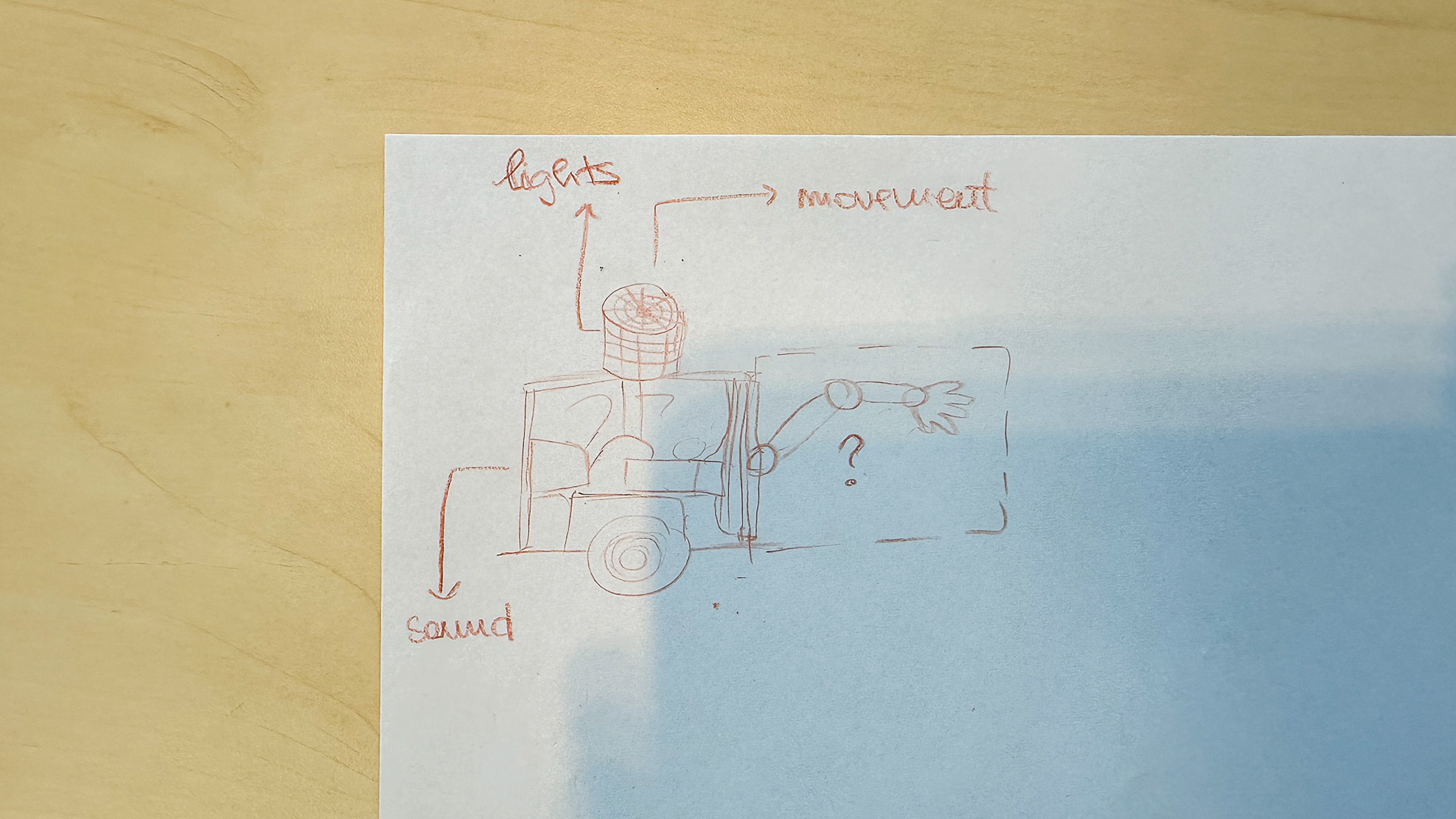
Figure 3. Result - Low-fi behaviour prototype for Alan.
7. What testing revealed that the Design-Time tool did not anticipate
The design-time tool from Figures 1 and 2 helped us organise the behaviour, but the walkthrough revealed several issues that were not obvious at first.
The first issue was that stillness can be an action. In the first version of the scenario, we mostly thought about what Alan should do. During the walkthrough, we realised that for an anxious dog, Alan sometimes needs to deliberately do nothing.
The second issue was that movement is ambiguous. A dog moving near the door does not necessarily mean the dog wants interaction. It may mean anxiety, searching for the owner, pacing, or avoidance.
The third issue was that owner reassurance can conflict with animal welfare. The owner may want updates and visible activity, but the dog may need low stimulation. Therefore, Alan should not optimise for engagement.
The fourth issue was that the owner app is part of the behaviour system. It is not only an interface after the interaction. What the app reports influences how the owner interprets Alan and the dog. Therefore, the app must avoid emotional overclaiming.
8. Behaviour architecture
The tool produced a first high-level behaviour architecture for Alan.
Alan’s behaviour should have a reactive safety layer and a deliberative support layer.
The reactive layer handles fast, safety-critical responses. If the dog moves away, freezes, hides, or comes too close in a way that suggests discomfort, Alan should stop, reduce stimulation, or retreat. This layer should override playful or interactive behaviours.
The deliberative support layer handles slower decisions. This includes deciding whether to invite interaction, activate a toy, send an owner update, or remain in idle mode. These behaviours should only happen when the reactive layer does not detect a reason to stop.
The architecture can be summarised as:
Sense: Door state, owner app state, dog distance, movement, sound, object/toy interaction.
Think: Possible separation trigger, possible curiosity, possible avoidance, possible voluntary interaction, uncertainty.
Act: Stay still, soft light cue, soft sound cue, small toy movement, retreat, log observation, notify owner.
This architecture fits a hybrid control approach. Brooks' work is useful for the reactive layer because it shows the value of simple, layered behaviours for robust response. Lazzeri et al. (2018) are also relevant because they describe a social robot cognitive architecture that combines low-level perceptual and reactive modules with higher-level interaction management.
9. Design implications for Alan
The Behaviour Design Tool led to several design implications.
Alan needs proximity sensing before it can safely interact with the dog. Without distance awareness, Alan cannot know when to stop or retreat.
Alan needs local behaviour rules that do not depend only on an LLM. A language model may help with owner communication, but safety behaviours should be scripted or rule-based.
Alan should use observable reporting. The owner app should report what was sensed and what Alan did, not make emotional claims.
Alan should start interactions with low-arousal behaviour: stillness, soft light, or subtle sound before movement.
Alan should have stop conditions for avoidance, freezing, hiding, or retreat.
Alan should treat non-interaction as a valid outcome. If the dog ignores Alan, that may be better than forcing engagement.
10. Evaluation of the Tool Outcome
The outcome of the tool is useful because it produced more than a story. It produced a behaviour model, a feature list, a set of scenario cards, and a low-fi prototype direction.
The strongest part of the outcome is the Step-Sense-Think-Act-Issue structure. It made hidden complexity visible. For example, the simple sentence "the robot calms the dog" became a sequence of sensing, interpretation, action, and failure handling.
The tool also improved our case because it shifted the design goal. Before this session, the robot was mainly imagined as a companion that could interact, play, and give cues. After this session, Alan became a robot that must first be safe, restrained, and able to stop.
The main weakness is that the test was still a low-fi walkthrough with human designers, not a real test with a dog or a functioning robot. Therefore, the tool gives design direction, not proof that the behaviour will work.
11. Evaluation of the Tool Quality
The Behaviour Design Tool worked well as a discussion tool because it was easy to use and made behaviour concrete. It helped us move from broad ideas to specific scenario moments.
Compared with a generic flowchart, the tool is more HRI-specific because every card includes social interpretation and risk. A normal software flowchart might say: "dog detected --> move closer." Our tool asks: "What exactly was sensed? What interpretation is being made? What if that interpretation is wrong? What issue does this create?"
However, the tool should be improved. First, each card should include a confidence level, such as low, medium, or high confidence. Second, each card should include a priority level, so safety behaviours can override playful behaviours. Third, each card should include a fallback behaviour. Fourth, the cards should be tested with actual robot movement or video prototypes, not only paper.
The relationship to our group assignment direction is clear: this tool bridges the design case and Alan's implementation. It identifies which behaviours can be low-tech or scripted, which behaviours need sensing, and which behaviours should not be automated too early. Even if the final group prototype focuses on only part of Alan's behaviour, this tool explains why certain features and safety rules are needed.
12. Reflection
This session changed how I think about robot behaviour. Before this assignment, it was easy to describe Alan's behaviour in simple story terms, such as "the robot notices the dog and helps calm it down." The Behaviour Design Tool showed that this sentence hides many design decisions: what Alan senses, how reliable that sensing is, what interpretation is made, what action follows, and what should happen if the interpretation is wrong.
For our pet companion case, the most important design outcome was the shift from active interaction to cautious support. The tool made clear that Alan should not behave as if it fully understands the dog's emotions. Instead, Alan should behave as if it is uncertain: start with low-arousal actions, use observable reporting, and include clear stop and retreat conditions. This made the behaviour design more grounded and safer than the initial idea of a robot that simply plays with or distracts the dog.
As a tool, the card structure worked well because it was simple enough to use quickly, but specific enough to reveal HRI problems. The Issue field was especially useful because it forced us to discuss failure, misinterpretation, and animal welfare rather than only the successful interaction path. However, the tool is still limited because it was tested through a low-fi walkthrough with human designers, not with the actual robot or a real dog. It gives a strong design direction, but not proof that the behaviour will work in practice.
13. References
Alami, R., Chatila, R., Fleury, S., Ghallab, M., & Ingrand, F. (1998). An architecture for autonomy. The International Journal of Robotics Research, 17(4), 315-337. https://doi.org/10.1177/027836499801700402
Brooks, R. A. (1986). A robust layered control system for a mobile robot. IEEE Journal on Robotics and Automation, 2(1), 14-23. https://doi.org/10.1109/JRA.1986.1087032
Fiore, S. M., Wiltshire, T. J., Lobato, E. J. C., Jentsch, F. G., Huang, W. H., & Axelrod, B. (2013). Toward understanding social cues and signals in human–robot interaction: Effects of robot gaze and proxemic behavior. Frontiers in Psychology, 4, 859. https://doi.org/10.3389/fpsyg.2013.00859
Honig, S., & Oron-Gilad, T. (2018). Understanding and resolving failures in human–robot interaction: Literature review and model development. Frontiers in Psychology, 9, 861. https://doi.org/10.3389/fpsyg.2018.00861
Vinciarelli, A., Pantic, M., & Bourlard, H. (2009). Social signal processing: Survey of an emerging domain. Image and Vision Computing, 27(12), 1743-1759. https://doi.org/10.1016/j.imavis.2008.11.007